Most buildings run visitor parking and shared amenities on a system that predates email: a binder at the front desk, a whiteboard, or a property manager who answers between nine and five on weekdays. Which is inconvenient when your guest arrives at eight on a Saturday, and useless when you want to know whether the party room is free before you invite anyone.
Both are booking problems, and booking problems are solved by being able to see availability.
How do I register a guest for visitor parking?
You add their plate and the window they need, and it becomes a permit.
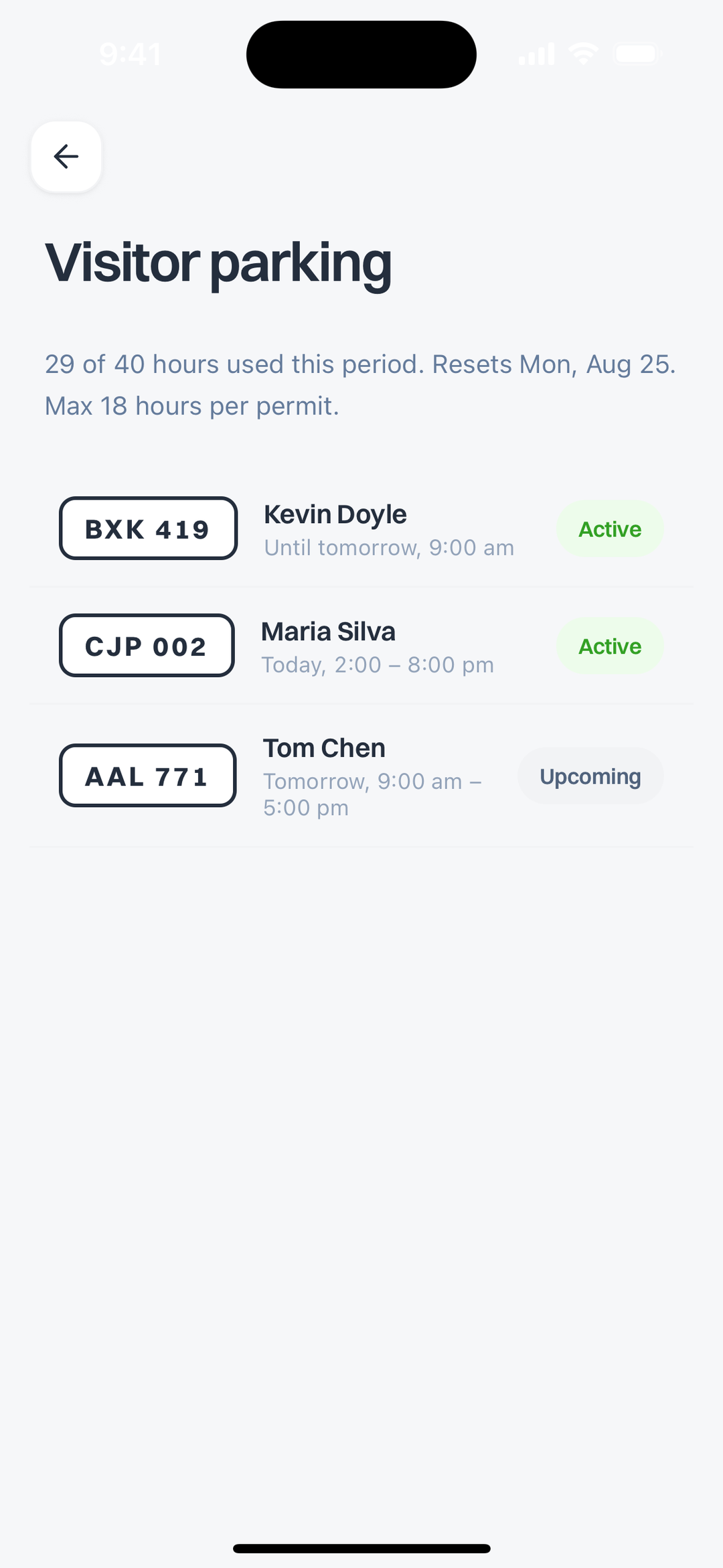
Each permit is a plate, a name and a time range. Your guest parks; whoever patrols the lot sees a valid permit against that plate. No paper tag on the dashboard, no note under a wiper, and nothing to hand over in person before they can park.
Permits show as Active or Upcoming, so a guest arriving tomorrow can be registered now and you can stop thinking about it.
How do I know if I have parking hours left?
The quota is on the same screen as the permits, which is the point.
Most buildings cap visitor parking, usually as hours per unit per period. That cap is normally invisible until you exceed it and someone tells you off. Here it reads as plainly as a phone battery: hours used against hours allowed, when the period resets, and the maximum length of a single permit.
Knowing you have eleven hours left before the reset is the difference between booking confidently and guessing.
How do I book the party room or the guest suite?
You look at what your building actually has, with its capacity and hours, and book it.
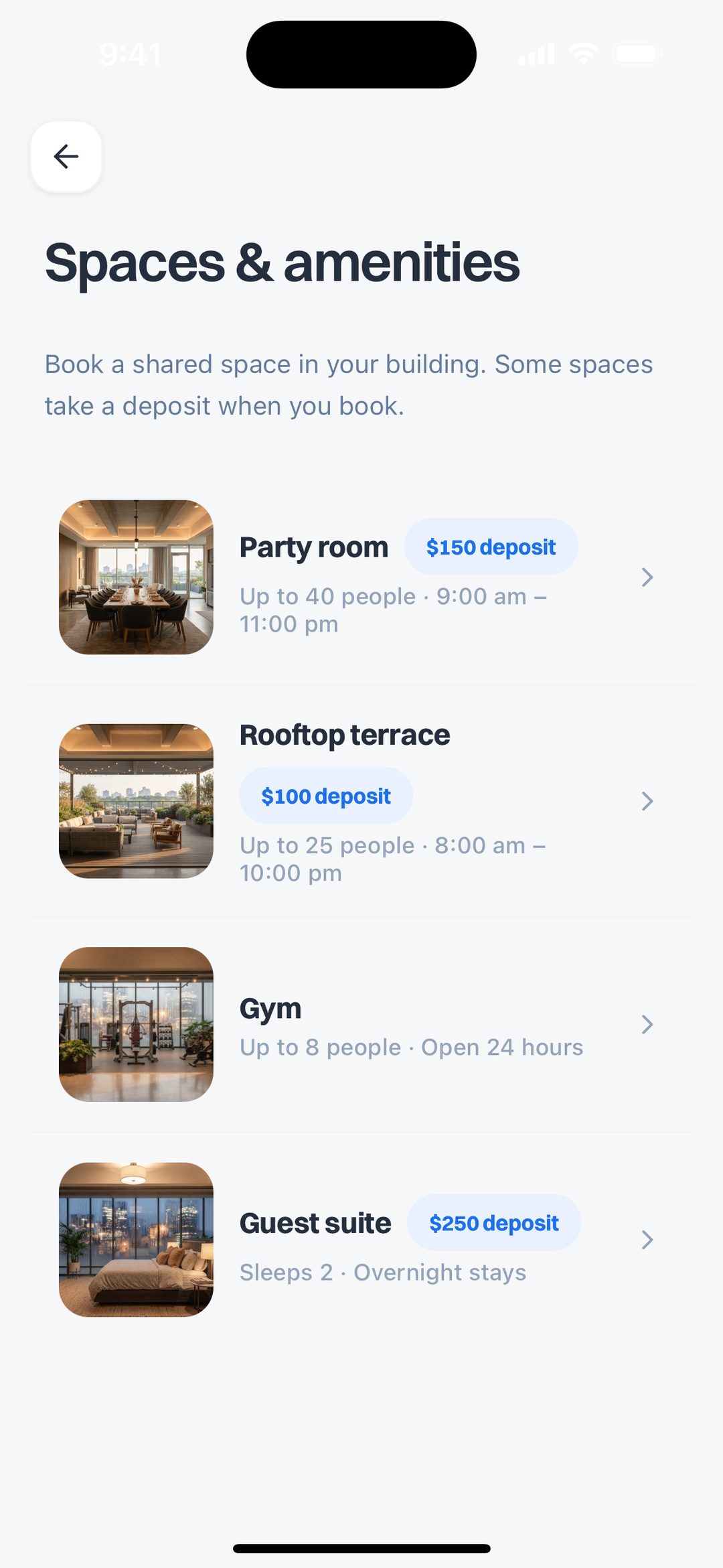
Each space carries the facts you need before committing: how many people it holds, when it is open, and whether it takes a deposit. A party room that holds 40 and runs until 11pm is a different plan from a rooftop that holds 25 and closes at 10pm, and you want to know that before sending the invitation, not after.
What is the deposit for?
It is the building's damage hold, and showing it up front is deliberate.
Some spaces take one and some do not. A gym generally does not; a guest suite generally does. The amount is attached to the space rather than buried in a policy document, so the cost of a booking is visible at the moment you are deciding, not at the moment you are committed.
Can I see what is already booked?
Yes, and this is the part that replaces the binder.
Availability is the whole reason these things are painful to arrange. When the only way to check is to ask someone, every booking costs two messages and a wait, and popular slots go to whoever asked first rather than whoever needed them. Being able to look is what makes a shared amenity usable rather than theoretical.
Do I need the front desk for any of this?
Not for the booking itself, which is the point of doing it this way.
The office still owns the rules: what the quota is, which spaces exist, what a deposit costs, when things are open. What changes is that acting inside those rules stops requiring a person. You are not asking permission for something already permitted, and you are not blocked by office hours for something the policy already allows.
Does this work in every building?
No, and this is the honest limitation.
Visitor parking and amenity booking are the building's resources, not yours, so they only exist here if your building is set up on Buzz Me Up. Everything else in the app is yours alone: answering your buzzer, who is on it, your buzz history. Those work whatever your building does, and need nobody's permission.
If your building is not on it, that is a conversation with whoever manages it rather than something the app can switch on. The six months offer exists for exactly that: introduce your building, and if they sign up your next six months are free.
What if I just want the buzzer part?
That works on its own and is the more common starting point.
The buzzer is a per-unit thing. You get a number, it goes in your building's directory against your unit, and the intercom starts ringing your phone. No building sign-up, no landlord approval, about two minutes of setup. Parking and amenities arrive later, if and when your building joins.
More on that in How Do Apartment Buzzer Systems Actually Work? and the setup guide.
The short version
Visitor parking and amenity booking are not hard problems. They are availability problems, and they stay painful only while the availability lives in someone else's binder.
Seeing your remaining hours, your guest's permit, and whether the rooftop is free on Saturday is most of the value. Get the app to see what your building has turned on.